

5 Signs Your Office Wi-Fi and Business Network Need Attention
Is slow office Wi-Fi disrupting your team? Discover five signs of business network problems and what to check before contacting IT.
Slow office Wi-Fi isn’t just frustrating. When employees struggle to access cloud applications, join video meetings or work with shared files, unreliable connectivity can interrupt everyday business operations.
But not every network problem is caused by slow internet service.
Weak wireless coverage, network congestion, outdated equipment, cabling problems or application-related issues can all affect performance. Identifying the actual cause is more useful than repeatedly restarting equipment or upgrading your internet plan without a clear reason.
Here are five signs your business network may need a closer look.
1. Employees Experience Frequent Wi-Fi Disconnections
Does your team regularly lose its wireless connection during meetings, calls or routine work? Occasional interruptions can happen, but repeated disconnections may indicate an underlying issue with wireless coverage, interference, access-point placement or network configuration.
Pay attention to whether the problem happens throughout the office or only in specific areas. For example, employees in a conference room may experience unstable connections while those closer to an access point have no problems.
What to look for: Repeated disconnects, dropped calls and devices that frequently reconnect to Wi-Fi.
2. Internet and Cloud Applications Feel Unusually Slow
If Microsoft 365, cloud-based software, file transfers or web applications regularly take longer than expected, your network may be contributing to the problem. However, slow performance does not always mean your internet connection needs to be upgraded.
The cause could be local wireless congestion, insufficient network capacity, an application issue or a problem with the internet provider.
Compare performance across multiple devices and applications. If only one service is slow, the issue may not be your office network.
What to look for: Delayed file access, buffering during meetings, slow cloud applications and recurring performance complaints.
3. Wi-Fi Works in Some Areas but Not Others
Your office may have excellent Wi-Fi near the router but unreliable connectivity in conference rooms, private offices or other work areas
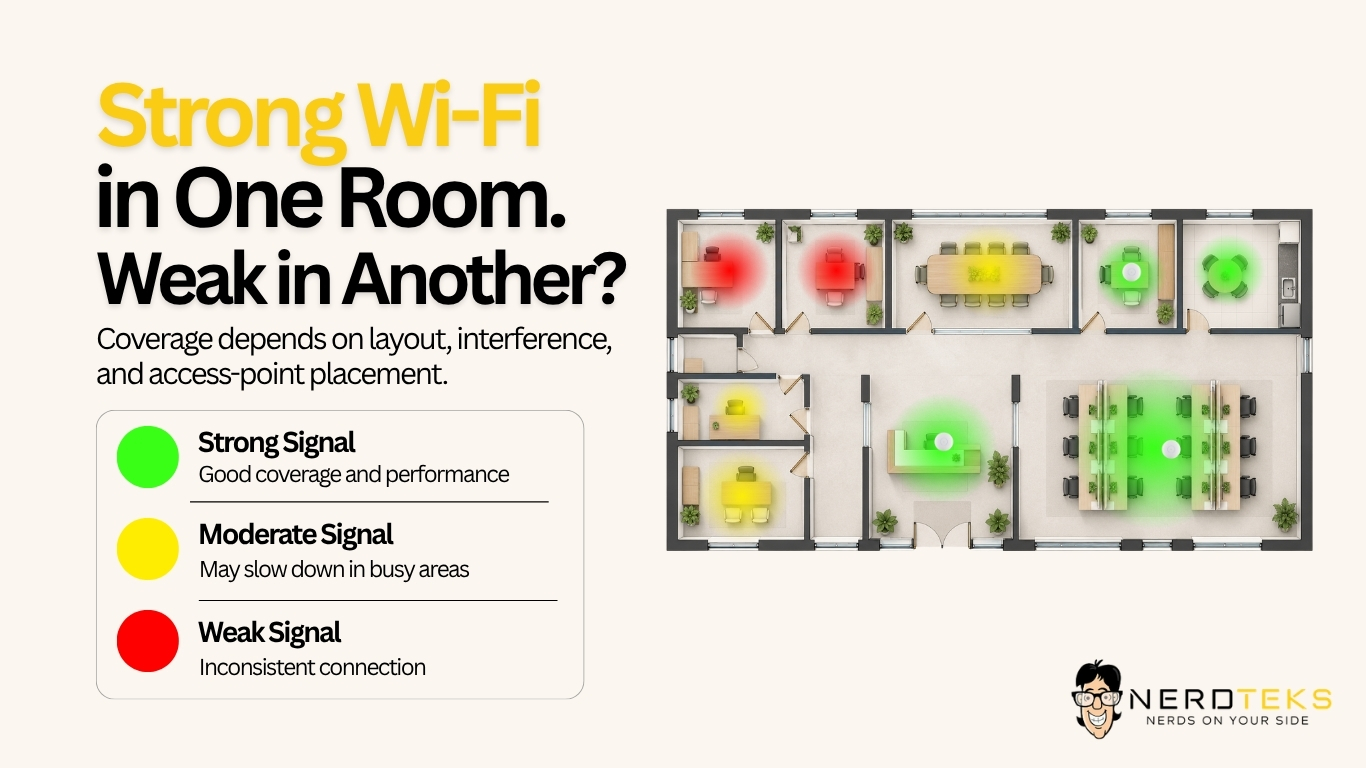
Several factors can affect wireless coverage, including:
- Walls and building materials: Concrete, metal and other materials can weaken wireless signals.
- Wireless interference: Nearby networks and electronic devices may interfere with Wi-Fi performance.
- Office layout: Furniture, partitions and equipment can affect coverage.
Access-point placement: Poor positioning can leave certain areas with weak or inconsistent connections.
Adding another access point isn’t always the solution. Poor placement or configuration can create additional problems. A proper wireless assessment should evaluate both coverage and performance throughout the areas employees actually use.
For businesses moving into new spaces or expanding existing offices, professional network and data cabling services can help support better access-point placement and reliable wired connections.
What to look for: Areas with weak coverage, inconsistent speeds or frequent wireless interruptions.
4. Video Calls and Cloud Collaboration Keep Getting Interrupted
Video meetings, VoIP phone systems and real-time collaboration tools depend on more than advertised internet speed. Latency, packet loss, jitter and network congestion can affect call quality even when a speed test appears normal.
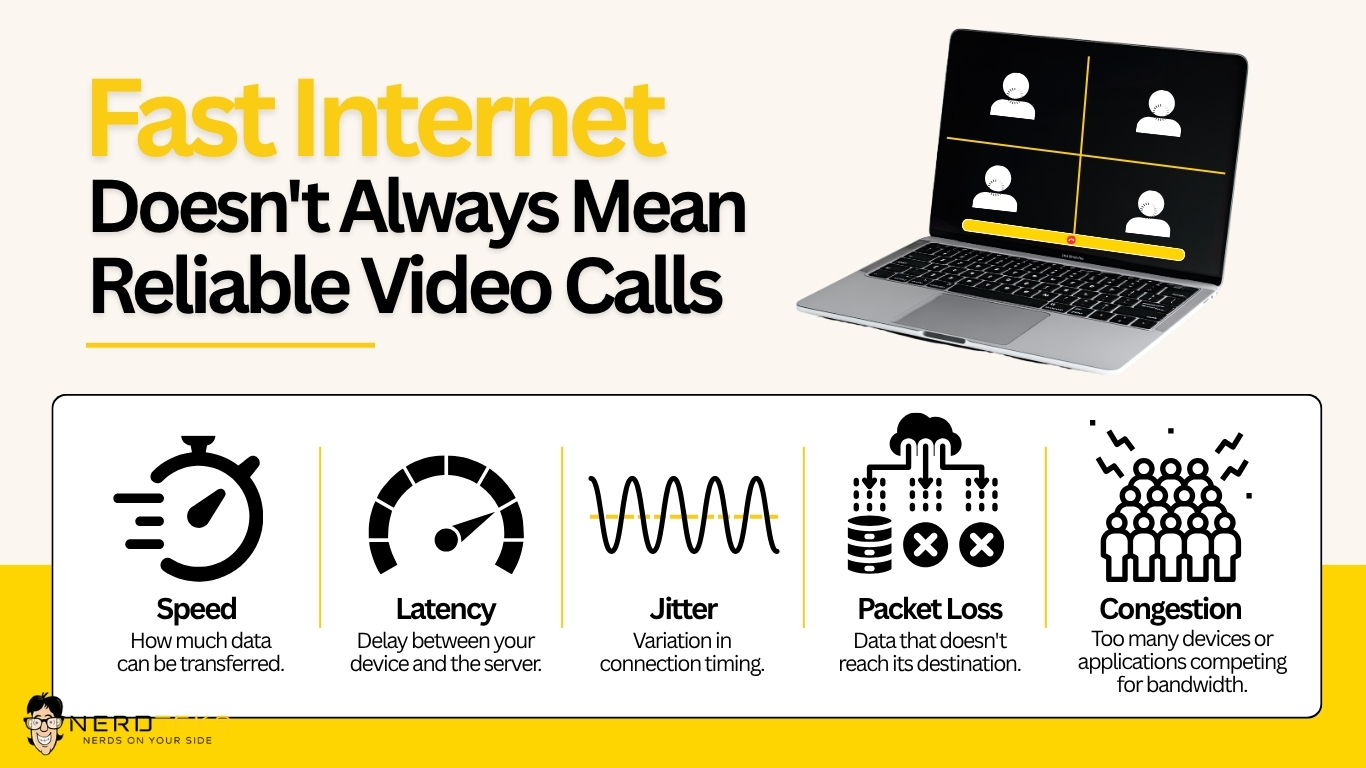
Employees may experience frozen video, delayed audio, dropped calls or interruptions when accessing shared resources. These symptoms deserve investigation, particularly when several employees experience them at the same time.
What to look for: Choppy audio, frozen video, disconnected calls and inconsistent collaboration performance.
A network review should look beyond signal bars to see how the connection performs where employees actually work.
5. Your Network May No Longer Match Your Business
A setup that worked for a small team may struggle after the business adds employees, devices, cloud applications or additional office space. As your business grows, your network may need adjustments to support:
- More employees and devices: Additional computers, phones, printers and connected equipment.
Office expansion: New workstations, meeting rooms or additional office space.
Cloud applications: Increased use of Microsoft 365, cloud-based software and online collaboration tools.
Changing technology needs: Updated security requirements, network equipment and connectivity demands.
Depending on the findings, that could mean adjusting access-point placement, addressing cabling issues, updating equipment or working with the internet provider. The goal is reliable access to the tools your team needs, not simply a higher speed-test number.
Older or poorly configured equipment can also contribute to recurring problems. However, replacing everything is not automatically necessary. A useful assessment should identify what is causing the disruption and recommend targeted improvements.
Businesses that need ongoing network maintenance, monitoring and technology planning may also benefit from Managed IT Services.
What to Record Before Contacting IT
You do not need to diagnose the network yourself. A few observations can make troubleshooting more efficient:





Share error messages or screenshots through your approved support channel, excluding confidential information.
Avoid resetting shared network equipment or changing security settings without coordinating with IT. An unplanned change can interrupt other employees and make the original issue harder to investigate.
Help Your Team Stay Connected
Reliable office Wi-Fi supports client conversations, collaboration and everyday business operations. Recurring connection problems deserve a closer look, not another round of guessing.
Nerd Teks helps businesses with IT support, networking and cabling. Whether the issue involves wireless coverage, network equipment or a broader connectivity problem, the right starting point is understanding what is happening and where.
Is unreliable Wi-Fi disrupting your workday? Contact Nerd Teks for help with your business network.
Latest Insights







Latest Posts